Posted in iPad, iPod Touch, QR Codes, Roanoke County Schools

Safe QR Code for YouTube Videos

Want to have a video center using iPads and iPods and Youtube videos?  Want to make sure there’s no ads or other videos included?  Then use SaveShare.TV.

AND…you can even use this site in conjunction with QR Code Generator to create QR Codes that link to these safe videos.  Here’s how:

1) Find the video you want to use on YouTube.

2) Copy the link into SafeShare.TV Site.

3) Copy the link you get from SafeShare to a QR Code Generator.  Make sure you choose “website url” for this, not Youtube Video.

4) Download the QR code for that video to use.  We use QR Code Readers such as i-nigma and Scan on the iPads and iPod Touches to scan the QR codes and watch these videos.

Try it out with the QR Code below:

Posted in Geocaching, iPad, iPod Touch, QR Codes, Roanoke County Schools, social studies

4th Grade Jamestown Geocaching

A few weeks ago, a teacher came to me wanting to do a Jamestown Geocaching Activity with her students.  I had been doing a lot of work on iPads, and had enjoyed some of the quick, 1 minutes video podcasts by History is Fun.org.  I decided to incorporate both the iPads and Geocaching into one activity.  Here’s the activity I created:

1.  Download Podcasts videos to at least 6 iPod Touches/iPads from iTunes.  You can find them here: Historyisfun.org Podcasts.  You’ll need the following videos:

  • The Voyage
  • John Smith
  • Powhatan/Pocahontas
  • Hardships
  • Representative Government
  • Women
  • Slavery (I used this one as a practice example)

2.  Hide 6 Caches with the following labels on each cache: Jamestown Cache Labels.  Mark the locations of the caches with the GPS Units.

3.  Students were broken up into groups, and given a clipboard, a Jamestown Geocaching Answer Sheet, an Order Strip for 6 Caches, and an iPad with the videos (but iPod Touch would work too), a pencil, and a GPS Unit.

4.  Students worked in groups to find and answer the questions using the videos.  I suggest the following jobs for members the group:

  • Navigator (Works GPS Unit)
  • Scribe (Writes the group’s answer)
  • Governor (Keeps folks on track, carries the number strips, reads the cache questions)
  • Historian (Carries the iPad/iPod Touch and plays the appropriate video)
  • Scout (Double checks to make sure the group is at the right cache number, Re-hides the Cache in the exact location, )
  • Judge (Checks the group’s answers with the QR Codes)

5.  When students were finished, they used the app, Scan, and the following Jamestown Geocaching QR Codes to check their work.  A traditional Answer Key is located here if you do not have time for this part of the activity.  Students re-watch the videos for the questions they’ve missed.

So far I’ve had two classes complete this activity, and they loved it!  I liked using the iPads because they were big enough for the entire group to see.  I found it really important to discuss reading the questions BEFORE watching the videos…and practicing with the Slavery video was very helpful.

____________________

Image:  Kolk, Melinda. compassrose.jpg. 1-Apr. Pics4Learning. 9 Nov 2012 <http://pics.tech4learning.com&gt;


Posted in Roanoke County Schools, Social Networking, Tech Tools

Pinterest Folks to Follow!

Pinterest Logo

By now, many of us have heard of  Pinterest.  For me, it took me awhile to “get it,” but now that I have, it’s been a place I go often for teaching tips, recipes, decorating suggestions, and so on.  There are some great resources out there for teachers!  Here are some of the ones I follow for good ideas:

Here are some suggestions for using Pinterest as a teacher:

If there’s anyone I’ve missed that you enjoy, please leave a post and let me know!

Posted in Instructions, Interactive Achievement, Roanoke County Schools

Updates to Interactive Achievement

There have been some changes to the Interactive Achievement Program, the program Roanoke County uses for Formative Assessment.  Luckily, the folks at IA have provided some great handouts to show how to use the updated features.  To find them, login with your IA account.  You will now need to use your whole email address as your login (your password will be the same).

Then, click on “What’s New” in the top right-hand corner.

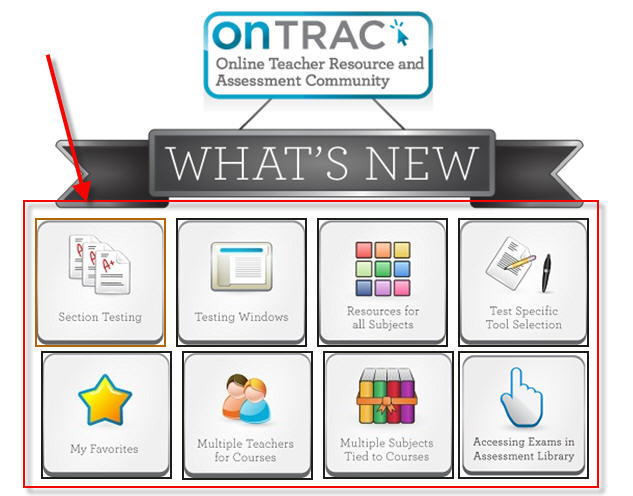
Next, click on a topic.   A handout will open for the topic.

The ITRTs have also updated the how-to handouts for IA.  You can find them here:

Assessment Library

Assigning Tests

Creating Class Lists

Print Test Session Lists

Reporting

Starting and Ending a Test


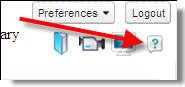
Finally, don’t forget that our system pays for support from IA, and it’s available to anyone who needs it.  Just click the ? in the top right corner.


Posted in English, Reading, Roanoke County Schools

Read to Me


Watch on-line streaming videos of children’s books read aloud by celebrities!  Check out the Read to Me Website!

On this site, children’s storybooks are read aloud by celebrities and storytellers.  Books are available for watching  and there are even lesson plans to help you incorporate the Read-To-Me videos.  You will see such stories as Fancy Nancy, Duck Soup, Excuse Me, Chrysanthemum, and even Hooray Hose (with Sign Language).  Very cool!