The newest edition to some of the fascinating resources in Google Maps/Earth, is the ability to tour the Ocean, complete with reef wildlife. To explore some of these locations, you will be using “Street View.” Here’s a quick video on how to use it:
Preschool Teachers and Primary Special Education Teachers received a new program, Letters Alive, to use with their students! It’s pretty cool. See a video below that talks about it:
When trying to implement this program, we discovered a couple of things that may help others, so I’m sharing them here. The most important thing we learned was that this program needs an integrated video card with lots of memory in order to work properly. If you descide to use it, it’s very important to work with Logical Choice before purchasing anything to make sure the computers you plan to run it on will work.
If you are one of the teachers that was lucky enough to recieve a kit, here are some things that may help you out!
Letters Alive Tips and Tricks
Use your cart for Letters Alive. Keep the document camera with the cart and leave it set up.
Make sure mat is flat as possible (store rolled, not folded).
The neoprene Mat is washable (do not put in dryer).
You can wipe cards with damp cloth but DO NOT LAMINATE or submerge.
Make sure the dongle and document camera are plugged in.
Keep the document camera as high as possible.
Use training videos in the software.
Bring alphabet card in from the right (up high).
Be careful not to cover cards.
The program runs in Full Screen Mode. Use Esc to exit and Alt+Enter to go back to full screen mode.
If you are having Document Camera isses:
Choose Letters Alive
Choose Letters Alive Camera Setup
Make sure auto focus is unchecked
There are three different modes for Letters Alive:
Letters Alive Mode
Introduces Letters
Uppercase and Lowercase
Sentences
Root Word Mode
Sounding out letters one at a time.
Uppercase and Lowercase practice
T-Shirt Mode
This works with Letters Alive T-shirts.
Ideas for the Classroom:
There are lots of ideas for using this program in the classroom on the Logical Choice Website . Check them out here!
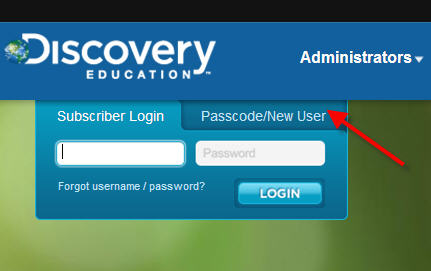
Many of our teachers use Discovery Education (United Streaming) videos on a regular basis. Some use the generic school account, but did you know you could have your very own account? Teachers with their own accounts can save the materials that they use in their own library – making it much easier to find next year. To create your account, you will need your school code (your ITRT knows this). Then visit http://www.discoveryeducation.com/ .
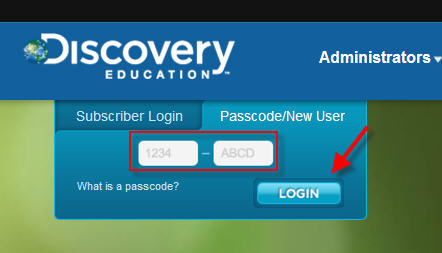
Step 1: Click on the Passcode/New User Tab.
Step 2: Type in the school Passcode. Your ITRT has this number.
Step 3: Follow the prompts to set up your Discovery Education account.
You can also follow this webcast that Meg Swecker created:
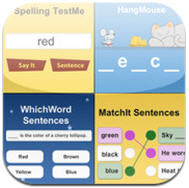
I know many of the teachers in my schools use Spelling City in their classrooms. I see the students come to the computer lab on Fridays to take their tests. I was so excited, though, to see that the site now has an iPad/iPod Touch app! Now students can practice in their classrooms or on their own handheld devices. It does allow you to take the Spelling Test, but it does not allow you to print results. You could have students bring you their device when they are done, though, and record their score right off their screen. If you have the premium membership, student grades area already recorded for you in a grade book like format.
You can definitely grab your students attention, or have them make their own as the beginning to a writing prompt. During the process students will need to upload their pictures, choose their political party, and choose the items in their platform. Very fun!
 Teaching with Technology