 I love International Talk Like a Pirate Day (September 19)! Well, basically, I just love Pirates!! I usually do something with geocache treasure hunting on this day, but this year I’m adding QR Code Pirate Fun. I’m posting Pirate Jokes with QR Code answers around the school. I know this activity isn’t all that education (though I think understanding jokes is a great higher level thinking activity and it’s a great way to practice reading skills), but my main goal is to excite students (and hopefully teachers too) about QR Codes and iPod/iPad use. Students will be using the app i-nigma to find the answers to these jokes. I’ll let you know how it goes! Meanwhile, if you want to use these Pirate QR Code Jokes for Talk Like A Pirate Day,here’s where you can get them!
Tag: itrt
Online Gradebooks
Need some suggestions for online gradebooks? Here are a few suggestions that I tried out briefly. They all have the following features:
- Free version
- Allow you to weight grades
- Customize grading scale and grade types (can use S,P,N as well as A,B,C,D,F)
- Access from anywhere with internet access (including iPad)
- Optional parent and/or student access
- wizard steps you through gradebook setup.
- wizard you through gradebook setup.
- does say free version has ads (though I didn’t see where in my short visit)
- a little less user friendly at setup
- Does have google apps interface
- Can import a list of students from a spreadsheet (CSV file) so you don’t have to enter each one.
If you have ever used these (or any other online software with similar features), please leave a comment and tell me about it. And if you decide to try one of these out, I would love to know that too!
Roanoke County Typing Program
Elementary students in Roanoke County now have a web based typing program called Typing Instructor. Students will be able to login and practice keyboarding both at school and at home. The links to the web site will be available on the instruction section of the Roanoke County Public Schools website and are also linked below.
http://rcps.typinginstructorkids.com Recommended for younger kids as it is narrated with step by step instructions.
http://rcps.typinginstructor.com Recommended for ages 8 and up as it is more self paced.
At the moment, we are waiting for the newest upload of students to be completed. Some students, though, may have already logged in over the summer and explored the programs since letters were sent to parents on the last day of school with logins and passwords. We will be sending you an updated list of student information just as soon as it’s ready.
Meanwhile, if you would like to explore the programs and you are a Roanoke County Teacher, there are test logins available. Let me know if you need one.
Webmail Calendar (Outlook)
For Roanoke County teachers who want to begin using the calendar feature in webmail, here’s a brief beginning handout. Hope it helps!
Sock Worms, Banana Split Milkshakes, and Homemade Pillows!
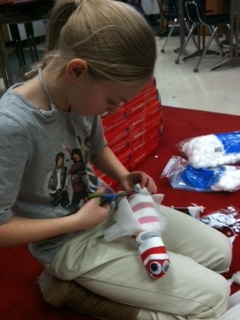
Need to know how to create a sock worm? Or banana split milkshakes? What about a pillow, potato woman, hamburger, or a friendship bracelet. Students in Mrs. Devlin’s class created videos to show you how!
In this project, they wrote step by step directions on storyboards, took pictures with digital camearas, and used photostory to record and create digital stories with step by step directions
.


Take a look a few examples below, and check out all their stories on Mrs. Devlin’s Class wiki!
 Teaching with Technology