Posted in English, Flipped Classroom, Links, Reading, Roanoke County Schools, Tech Tools

Newsela and Blendspace

Newsela — (Grades 2-5) This site provides current event articles on various reading levels (sports, health, science, arts, kids, etc).  Each day there are new articles that you can assign to your class (or read in small groups).  Each article has about 5 different reading levels (by lexile level)…so students can read about the same topic at their own level.  There are quizzes students can take, and best of all, there is a search bar that allows a teacher to search for articles that relate to certain reading skills (Author’s Purpose/Point of View, Text Structure, Central Idea, etc).  It might be another resource to add to the list of ways to engage your students in Reading.
Blendspace — (All Grades) Love, love this resource!  Blendspace allows you to create collections of web resources on a certain topic (videos, websites, pictures, etc).  This resource would be great to use with your students in the computer lab, as a small station within your classroom, or even as a way to organize materials you will present to your students on your Activboard.  You can add quizzes and monitor student progress too, if you want.  There are even tons of lessons already available that you can use immediately with your students. We are going to be encouraging you to move away from Portaportal (due to all the ads), and this is an excellent resource to take its place. 🙂
Posted in 3D Printer, English, Reading, Roanoke County Schools, STEM

Tinkerplay

I’ve been playing around with the app, Tinkerplay.  I started with my MakerMonday group of students and successfully printed one to the delight of the child who made it!

Then students in our FACES Special Education class designed characters during their Makerspace time.

Finally, I brought in a class of 22 third graders who are reading The Indian and Cupboard.  They designed action figures to place in the cupboard.


From those three trials, here’s what I’ve learned.
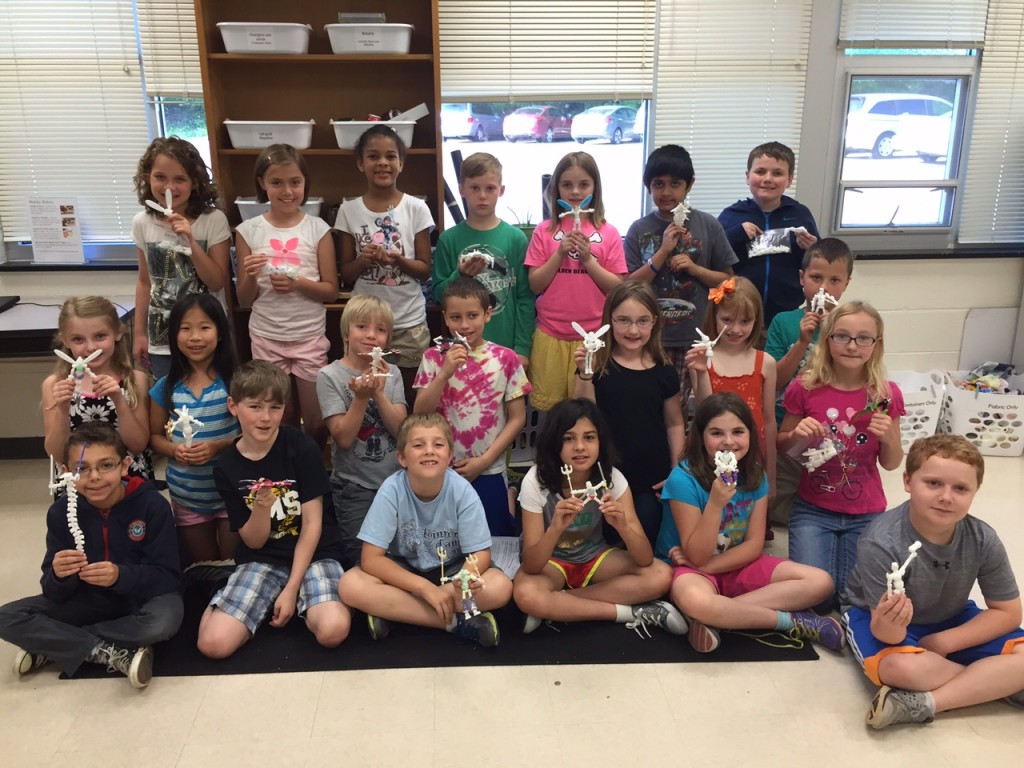
  • The smaller the scale, the easier it is for the action figures to break.  I found 75% was perfect.
  • Students can easily be given parameters to keep their figures from getting out of hand.  In the beginning, I had one action figure with 75 pieces!  I limited students on the amount of filament (grams) and the estimated print time.  They had no problem with this.
  • Saving is a bit complicated.  I attached Tinkerplay to our school dropbox account and saved to there.  I found that it automatically named the file with a number based on the time of day it was saved.  That meant, theoretically, if I didn’t clear out the folder before a group began saving the next day, things could get messy.  I also found that it was important to stagger saving so that people didn’t save on top of each other.  One save per minute.  I showed the students how to find the file name after it had saved so they could write it down.  It made it much easier to know whose was whose later.
  • Taking a picture of the finished creation helped students put them together when printing was finished.

IMG_1910

Posted in 21st Century Learning, Makerspace, Math, Roanoke County Schools, Science, STEM

Mouse Traps with 3rd Graders

Mrs. Weikle’s class, with the help of Mr. Clark, visited the Makerspace for a STEM activity. They created Mouse Traps that contained at least one simple machine and one 3D shapes. Then they used Pic Collage to display their creations. Take look below!
Take a look at a few of their traps in action!

 Cross posted at Oak Grove Digital Archive.