Posted in Salem City Schools, Tutorials

Quizdom PRS (Clickers) Tutorials

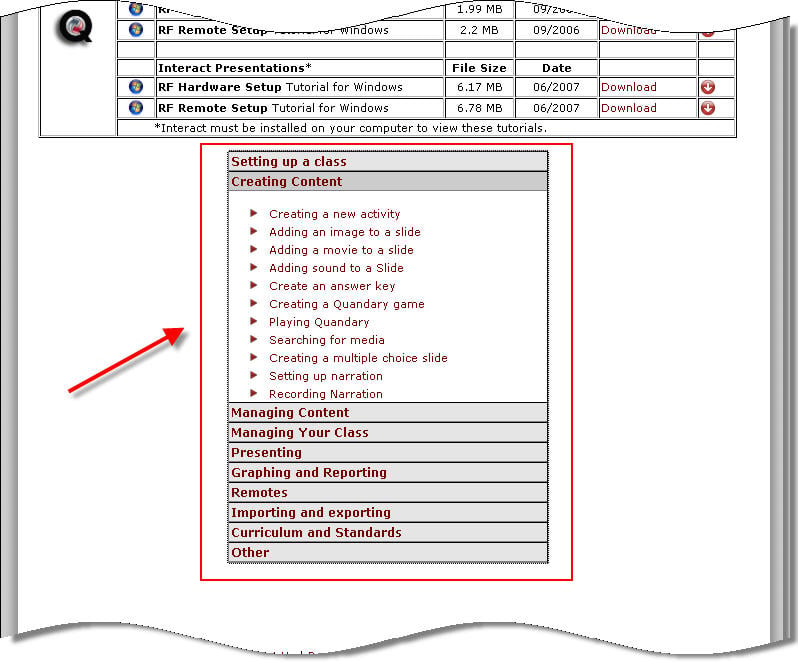
I know lots of teachers have wanted to use the Quizdom Personal Response System (clickers) this year but haven’t found the time to sit down and “play around” with the software. The software is installed on teacher laptops, so if you want to look at it over the summer (or just remember this post for next year), the Quizdom website contains some step-by-step tutorials you can check out to help. An example of one is below.  To see more, click here.
http://www.qwizdom.com/Tutorials/creating%20new%20activity.swf

When visiting the site, I suggest you focus on the tutorials under in the middle of the page:

Please let you know if you create anything! It would be nice to gather a collection of Quizdom activities to be used across the division!

Posted in Ideas, Links, Salem City Schools

Picture Books for the Smartboard on Lookybook

A group of technology educators on Twitter have been passing around this great site for Early Readers on the Smartboard. It’s called LookyBook, and it presents picture books in a format that you can use on the Smartboard (or any computer, really). Here’s an thumbnail example I felt was appropriate for this time of year. Click on the book once to turn pages and twice to see the larger version on the Lookbook Website.

http://www.lookybook.com/embed/1498-embed.swf

Using the Smartboard, you can present a picture book in a way that all children can see it easily (or allow them to present it), AND you can WRITE on the book. Cirlce rhyming words, highlight descriptive words, pick out punctuation…all using the Smartboard pens. *The writing in a few of the books is pretty small, so you’ll have to check them out first to see if this will work.*

Another neat feature is that the site will allow you to customize your own virtual bookshelf where you can store your favorite stories. Currently there are over 300 books to choose from, but more are being added every day.

Check it out here!

Posted in Fun, Salem City Schools

Stress Relief with Virtual Bubble Wrap

Okay, I’m not sure about everyone else, but I can use anything to relieve stress right about now. NOT that I’m stressed about SOL testing, because it will all go fine, but just because it’s that time of year. So here’s something silly that’s helping me….Virtual Bubble Wrap (be sure to check out the manic mode). If that link doesn’t work, you can try this version.  Thanks to Teachers Love Smartboards blog for this one.

Oh yeah…educational value….counting? maybe?

Do you have a neat stress relief site? Leave a comment to tell what it is!

Posted in Salem City Schools

How Have You Been Teaching with Technology This Year?

I’ve been amazed at all the creative projects I’ve seen this year! Occasionally, I pick out one or two technology projects to write about here…but I’ve seen so many more great activities that I haven’t had time describe! So, here’s your chance. Is there a fun project you did this year with the computers? The Smartboard? The Elmo or digital camera? Did you find a great website to use with a particular unit? Is there something you saw someone else do that looked neat? If so, please leave a comment. I’ll start with a few that come to mind (that I haven’t had a chance to write about yet):

  • Mrs. Overstreet has started a classroom blog that includes awesome slideshows and updates for parents.
  • Mrs. Salvat had her kindergarteners practice typing words they could read and inserting pictures to go with them.
  • Mrs. Pinello, Mrs. Stanely, and Mrs. Kier have been using the Elmo all year to help with Interactive Notetaking.
  • Mrs. Carpenter had her students create a book about George Washington Carver using Max Write to illustrate sentences about him.
  • Mrs. Laprad had groups of students use Storybook Weaver to write and illustrate stories.
  • Mrs. William’s students will be tracking Flat Stanley’s Adventures in Google Earth.
  • Mrs. Hughes used Kidspiration to make concepts webs about Greece and Rome and Mrs. Heltzel had some very detailed Kidspiration maps hanging outside her classroom a few months ago.
  • Mrs. Dick had her students create an “I Have a Dream Podcast” in honor of Martin Luther King, Jr. and Miss Hall had students create a podcast about Black History Month.
  • Mrs. Valentine, Mrs. Hartberger, and Mrs. Pitts are working on a collaborative Monster story project (using Kidpix) with classes across the U.S. (more on that later).
  • Miss Erickson’s class used the digital camera and PowerPoint to practice possessives.
  • Mrs. Chittum is having students create slide shows (not sure on what yet, but the kids keep talking about it!)
  • Mrs. Barnett’s class has a class webkinz. I believe there might be some other classes doing this too! What a great “spin” on a classroom “pet!”
  • Mrs. Wright at GWC has been using the Smartboard (especially the pen tools) with websites to practice comprehension strategies with her students. Mrs. Wright at East used the Smartboard to have students sort topics according to the Dewey decimal system.

Even as I get ready to submit this article, I can think of more. So, don’t be shy! Hit the green comment button right below this post, and tell me something you’ve done (or something someone you know has done). Not only does everyone deserve a pat on the back for their hard work with technology, these ideas can also help others think of things to do with technology next year (including me)!

Posted in Projects, Salem City Schools

4th Grade Virginia Studies Projects

I was horrible at history when I was in school, especially if it involved memorizing dates and names. I am a “big picture” learner…I stink at details. I learned information better if I could put dates and people into stories. I remember that my mom used to teach me mnemonics and other techniques to remember facts I had to memorize. I think that’s what’s made me enjoy working with Virginia Studies classes on projects this year: I’ve watched the teachers make history memorable and understandable for students with these projects. If I’d had teachers that allowed us to do projects like these, maybe I’d have had a much easier time learning history back then!
The first project was a podcast about the 4 regions of Virginia. Mrs. Ingram at East lead a group of students as they wrote 5 different segments–one for each region. It turned out great, and they even had a catchy way to remember the regions.

Press on the button below to listen:

The 5 Regions of Virginia

The next Virginia Studies project involved using Timeliner, a program for creating a visual timeline of certain events. Mrs. Barnett and I worked with two of the 4th grade classes at East to help them create broad timelines that included the most important events in Virginia History. Mrs. Barnett wanted students to see the time span between events that happened, especially the large span of time between the American Revolution and the Civil War. This was a way of placing details into a big picture context. Take a look at some of the ways they displayed this information:

http://docs.google.com/EmbedSlideshow?docid=dfx4q4dk_115f3sktxd6

The most recent project was a podcast created under the direction of Mrs. Crotts at GWC. The students met with her and wrote their own scripts for this podcast. I was unable to be at the school to help them record, so a couple of students learned to use an MP3 player to record their classmates all by themselves. All that was left for me to do was add music and put it all together. I’m always amazed at the creative ability of students when given independence…the result was incredible. Take a listen:
Ready, Aim, Fire! SOLs! — American Revolution

In the end, the students even wrote thank you notes to both Mrs. Crotts and I for helping them with the podcast, which totally made my day!!!

All three of these projects were wonderful ways to engage student creativity and to help them see the broad picture and stories behind history facts…while using technology!! Thanks, Mrs. Barnett, Mrs. Ingram, and Mrs. Crotts for allowing me to work with you and your students this year. I’ve had a blast! I hope your students did too!