Posted in Ideas, Links, Roanoke County Schools

Welcome Back with Wordle!

Want an easy back to school activity that will help you begin to know your students?  Try Wordle!  Here’s an example of an About Me activity using it. Please remember to use only first names if you do this with your students.

Wordle: Me
 
The instructional ideas for this resource are endless. You can find some of these ideas in this post, Wordle Word Clouds. I also suggest taking a look at the ideas Tom Barrett has collected from many other educators below:

Finally, you may want to check out Jen Wagner’s Guess the Wordle Wiki. There she posts different Wordles throughout the week, and students are encouraged to guess their subject using the words in the Wordle (Monday is an easy wordle, Wednesday is a little harder, Friday is the hardest). She will also be adding a Thursday Wordle that will be about a book (librarians, this might appeal to you)!

If you have your students create Wordles, make sure you direct them to this exact URL (http://www.wordle.net/create) so they bypass the gallery of other Wordles. While most of the examples in the gallery are usually okay, from time to time inappropriate words do appear there. By going straight to the “Create” area, you lessen the chance that students run across inappropriate words. 🙂

If you have never used Wordle before and would like some help as you explore it with your students, please contact me!

Posted in Blogs and Blogging, Links, Salem City Schools

iGoogle Follow-up

Following the our iGoogle Workshop, I’ve had a few requests for blogs to add to your iGoogle page.  Here are a few I like to follow:

Technology in Elementary Classrooms:

Welcome to NCS-Tech
Instructional Technology Specialist
Artful, Tuneful, Beatful
Digital Passports
My Technology Journey
Primary Preoccupation
Tech Thoughts by Jen

Other ITRTs
(Pam Elgin) Technology Medley
(Meg Swecker) Giant Stride
(Brian McKee) Brians TRT Blog

I have many more of these if you want…

Gifted
(Amanda Gibson) The Gifted Corner

Smartboard Blogs:
Teachers Love Smartboards (probably my all-time favorite)
Talking SMARTBoards & Much More!

News:
BBC News in Pictures
CNN Top Stories
So Salem Blog
Roanoke Times

If you need help remembering how to add an RSS feed to your iGoogle Page, don’t forget to take a look at your iGoogle Handout.

If you find that you have a lot of blogs that you want to follow, it might be good to start using Google Reader.  Will visit that topic soon! 😉

Feel free to comment and add some of your favorites!

Posted in Links, Salem City Schools, TechABCs

A is for Avatar

In the technology world, and avatar is a representation of you (many times a cartoon). Many people use them instead of pictures of themselves in profiles because it adds a little anonymity. If you have students blogging or creating other online projects, you might want to have them create an avatar.


The Build Your Wild Self section of New York Zoos and Aquariums website is great site to use to make avatars and to learn about animals at the same time! Here’s my Wild Self!

After students create their “Wild Selves,” they can choose to save the picture to their computers. To do this, choose Get a Wild Desktop. Then right click on the picture and choose save! It’s that easy!

Posted in Links, Salem City Schools

Ways to Post Homework

This post is mainly for teachers at East Salem.  If you haven’t already switched from SchoolNotes to another service, we’d like you to try and make that switch as soon as possible.  Here are some ideas and examples.  Please let me know what you decide to do so I can make sure it’s linked with our school site!

Tested and Recommended:

1. Create a Webpage

Webpage example
Please email me and I can help you get set up quickly and easily!

2. Weebly

Weebly Example

3. Edublogs

Edublogs Example
Please let me know if you choose this so I can turn off the ads for you.

4. Classblogmeister

Classblogmeister Example
(Please email me for East Salem’s school code)

Other ideas:

1. Tumblr

2. Google Pages

Google Pages Example

3. Posterous

Update by sending an email and it appears on your web page like a blog.

Posted in Ideas, Links, Salem City Schools

Easy Jeopardy Game Maker (Without PowerPoint)!

Want to quickly make Jeopardy games to play with your class without the hassel of editing a bunch of templates?  Check out this amazing new resource, Jeopardy Labs!

Here’s a sample game.  Students click on the point amounts to view questions, and then keep score at the bottom of the board with the + and – signs.  It will allow you to keep score for up to 10 teams!

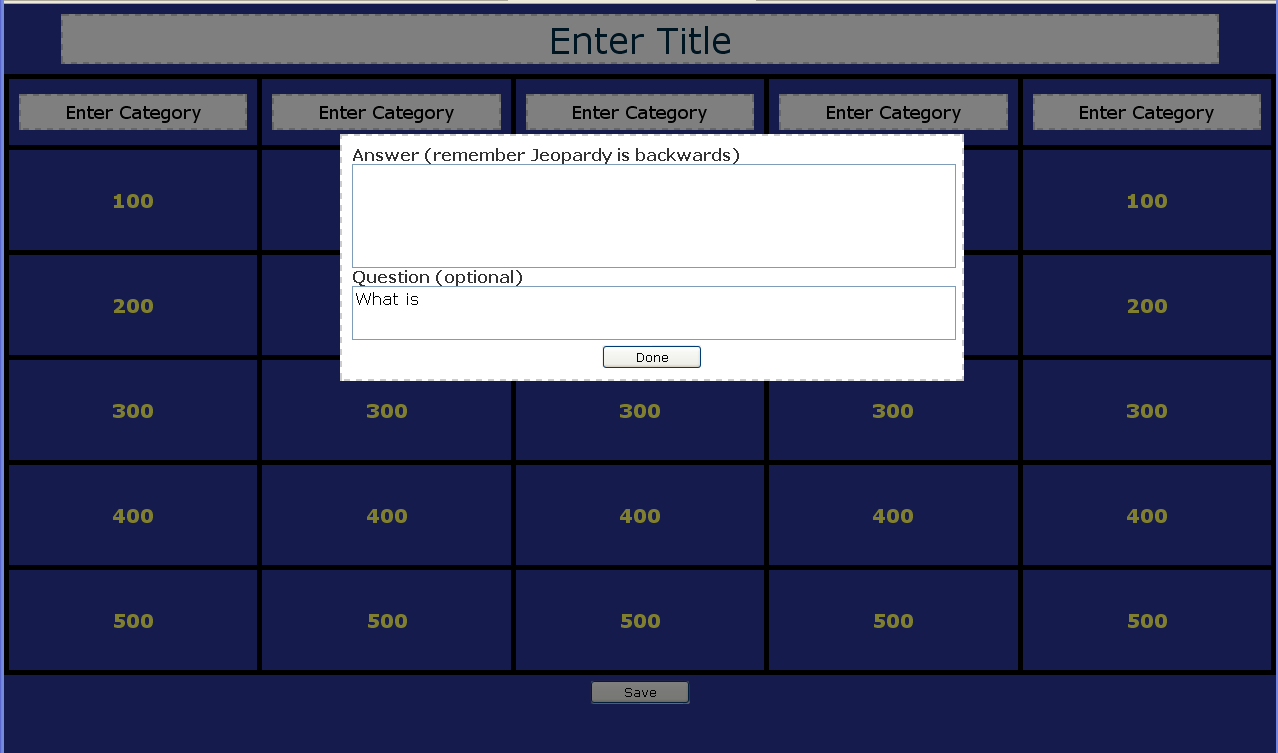
Creating your own game is easy too.  You just click in the Title and categories to edit, and click on the point amounts to add new questions.  When you are finished creating a game, the site will give you a web address to your game.  Hang on to it to find your game again!

This is hands down the BEST resource I’ve found to date to create your own Jeopardy game!