Posted in Ideas, Links, Tech Tools, Web 2.0

Wall Wisher

Wall Wisher is a website that allows you to create a virtual wall where “sticky notes” can be added on any topic.  Here’s an example of a Snow Day Wall (feel free to add your own ideas)!  It’s very simple to make and add to a wall, and you can moderate everything that appears on it (making it safe to use with your students).
http://www.wallwisher.com/embed/snow-day
 

Make Your Own Wall

Step 1: visit the Wallwisher website.
wallwisher1

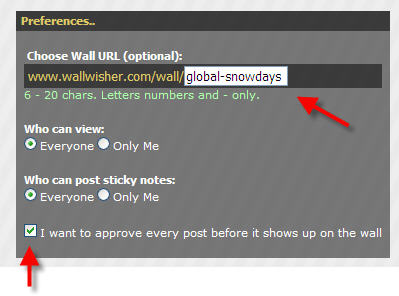
Step 2:  Create a URL for your wall, and choose your preferences.  Make sure to check the box that says “I want to approve every post before it shows up on the wall” if you want to manage posts.
step2

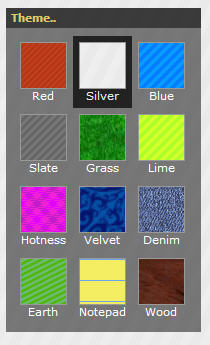
Step 3: Choose a theme for your wall.

step3

Step 4: Choose a picture for the top of your wall, as well as the title and subtitle that will appear at the top.
step5

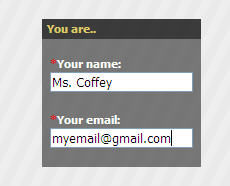
Step 5: Enter your name and email address (use a real one because this is how you will receive a password to login and manage your posts)

step6

Step 6:  Click done.  Your wall is now ready!

Post on a Wall

Step 1:  Double click anywhere and type your comment.  It can only be 140 characters long, but you can link to pictures or videos on the internet.

step8

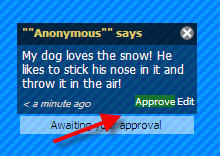
Step 2: To manage your posts, log in to the site.
step7

Step 3: Click approve on posts for them to appear.

Other Options
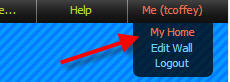
 step9

To change your password, Build a New Wall, or View all your walls, click on Me > My Home.

Classroom Use

There’s a ton of ways this can be used in a classroom!

  • Use for KWL charts–have students post stickies about what they know, what they want to know, or what they have learned about a topic.
  • Gather data on a topic (especially great if you want to collaborate with another classroom).
  • Writing sentences (pick a topic, like What I want for Christmas and have students post).
  • Answering questions.  Writing Questions.
  • Birthday, Get Well, or Special Holiday Wall.
  • Facts on a topic.
  • If you have a class blog, you can embed the Wall write on the blog (just like I did above).
  • Post links for students to visit.
  • Link to pictures and videos on a topic
  • Vocabulary–post a word and have students make sentences using that word.
  • Field Trip–have students post what they’ve learned or their favorite parts.
  • Gather strategies for solving a problem.
  • Respond to a novel.
  • Book Reviews.
  • Veteran Honor Wall, Going Green Pledges, Red Ribbon Pledges, etc.

For more ideas, visit Tom Barrett’s Interesting Ways to Use Wallwisher in the classroom.

Posted in Links, social studies

History on Tap Blog

The History on Tap blog is a great place to find resources that match Virginia’s SOLs for Social Studies and History, including games, foldables, presentations, study sheets, and more. It has resources for K-12, including tons of great things for VA Studies. It is updated and maintained by a Lisa Pennington, a Social Studies Specialist in Portsmouth, VA.  If you teach social studies content, check it out!

Posted in Fun, Geocaching, Ideas, Links, Projects, Roanoke County Schools, Web 2.0

Projects, Projects, Projects

This article is a follow up to yesterday’s inservice at Clearbrook.  We discussed Global Projects, Using Skype, Wiki Ideas, and Geocaching and Geobugs.  Wow, that was a lot of stuff!
 
Shelia Terry from Virginia Beach was able to skype with us and talk a little about her use with Skype with her students there.  She gave us some great information about skype, and send us a link to more Skype info on her wiki!    

We also talked a lot about some existing global projects you can join. 
One of the project places I highlighted was the site by Jen Wagner.  I love her projects!!
 
The other project I mentioned by name was the skype project called Mission 00 Rain about Cloudy with a Chance of Meatballs.  I remember that a few of you were interested in it as well.  It’s for grades 1-3, but you need to register by Oct. 10! 
 
Finally, we did some geocaching and talked about geobugs.  In case you all are interested in geocaching for fun, the geocaching site is www.geocaching.com.  You can create an account for free, and download the locations of caches to many types of gps units.  The newer ones for cars will even let you do this.  It’s tons of fun, and they are EVERYWHERE…so it’s also great for family trips or vacations. 
 
If you and your class want to track the Big Lick Geobug, here’s it’s story.
http://tcoffey.edublogs.org/2009/06/03/geobugs/
 
Finally, an Oliver K. Woodman Geobug will be leaving Roanoke in the next few weeks.  He’s heading to Redcrest, California.  If you’ve read the book, The Journey of Oliver K. Woodman, you’ll know why!  Let me know if you want me to come to your class, show a geobug, and get your started following him too.  🙂
Posted in Clip Art and Images, Links

Phillip Martin Clip Art

school_backbusAs I sit here working on a project that requires some clipart, I’m reminded of my favorite FREE clipart site of all time for school projects. I’m not sure if you know about it already, but just in case you don’t, here it is:

Phillip Martin Clip Art

You can find CUTE, elementary clipart for all subject areas, and even graphics that match the SOLs in a cute way.  I love it!

Just in case you’ve never downloaded clipart from a website before, here’s how you do it:

  1. Left click on the small version of the image (so you can view it in it’s largest form).
  2. Right click on the large form of the image.
  3. Choose “Save Picture As” or “Save Image As”
  4. Find a spot to save it on your computer. Remember where you put it so you can find it again.
  5. Click Save.

Phillip Martin, the artist, also creates cute powerpoints based on school subjects. You might want to check them out while looking at his site.

(Phillip Martin allows you to use this clipart free for your classroom, newsletters, and other non-profit things…just as long as you do not add it to other clip art collections. Please honor his request when using these wonderful resources.)

Posted in Fun, Holidays, Links

Talk Like a Pirate Day!

Saturday be Talk Like a Pirate Day, so you might want t’ celebrate Friday or Monday with sprogs. Here’s some thin’s t’ get you started…

Links:

The Orginial Talk Like a Pirate Day Website

English to Pirate Translator (a must have for this important day)

Need some Pirate facts? Take a look at this wiki, ARR Pirates, created by Fourth, Fifth, and Sixth Graders!

Pirate Challenge Geography Game (for the older sprogs)!

Walk the Plank! Game (Compound Words)

A Fun Button

Pirate Numbers (K-1)

Pirate Crafts (Great hat here)