Posted in iPad, Projects, Roanoke County Schools, social studies

Diversity Pic Collages

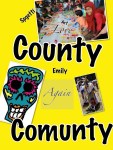
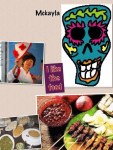
Mrs. Chamberland’s Social Studies class is studying Diversity.  This past week, they used the iPad app, Pic Collage, to create digital posters showing what diversity in the United States look like.  Here was their challenge:

Create a Pic Collage that helps show what diversity in Virginia looks like.  Include pictures and words.  You must have 3 examples of ways you see diversity in your life. You must use pictures and words in your collage.

Their projects are below!

Posted in iPad, Projects, Roanoke County Schools

Second Grade Rule Posters

It’s a new school year, and 2nd graders at Clearbrook have been discussing the rules for 2nd grade, their school, and their community.  They used Pic Collage to make rule posters!

This was a great project for introducing how to use Pic Collage, for practicing working in groups, and for learning to transfer work using the dropbox app.  I’m looking forward to see what other things they create with this app in the coming months!

Posted in iPad, iPod Touch, Presentations, Salem City Schools, SPED, SPED iPads

iPad Apptivities for All Learners

Here’s the handout from the Salem City Schools SPED Presentation:

iPad Apptivities for All Learners

App Lists


Posted in Instructions, iPad, Roanoke County Schools, SPED

Signing Out of iTunes Store on SPED iPads

For Roanoke County SPED Teachers Only!

Here is a quick How-To on signing out of the iTunes Store.  The steps are simple:

Go to Settings>iTunes and App Stores

Click where it says Apple ID: xxxxxxx@gmail.com

Choose Sign Out.

http://www.educreations.com/lesson/embed/8252820/

Remember that SPED iTunes Accounts are not to be used to purchase apps…only to update the existing ones on your iPad.  Your iPad should never be logged into SPED accounts in the area above.