Meg Swecker, an ITRT from Roanoke County, is currently in Cozumel, Mexico. She has been making VoiceThreads for area schools to use in class, and posting them. Five classes from Salem City Schools have had a chance to participate in the project. You can view all the VoiceThreads from the project here. Thanks, Mrs. Swecker! We’ve had so much fun learning about ocean life with you!
Questions for Scuba Diving ITRT
Classes from both G.W. Carver and East Salem have put together a few questions in a Voice Thread for our friend, Mrs. Swecker, as she travels to Mexico to scuba dive.
[kml_flashembed movie="http://voicethread.com/book.swf?b=20530" width="480" height="360" wmode="transparent" /]
GenTech Show with Sean Sharp, ITRT from Floyd County
The GenTech crew interviewed Sean Sharp, an ITRT from Floyd County, on their latest podcast episode. Sean talks about some exciting ways Floyd County is using technology to help with assessment. He also talks a bit about the challenges and rewards of working in a rural school district. Take a listen! While you are at it, you might want to check out Sean’s blog too!
Virtual Tour Site
Wow…I just ran across this link, Panoramas.dk, and it’s worth it’s own post. I have to give Brian (TRT from Williamsburg) credit for finding the site since I found the link it in his blogroll on his blog. The site contains Panoramas (306 degree views) of various places around the world including the Giza Pyramids, the Colosseum, the Apollo Missions, the Great Wall, the Yulong River, and many, many more very cool places! My favorite was a gorgeous Panorama of the Krakow Military Cemetery on All Saints Day. There are some ads in the sidebar and at the bottom of the site, but nothing to obtrusive. I did notice that some of the panoramas had links to show the place in Google Earth. I have not had a chance to try it out in the lab or on the laptops, so you’ll want to test the site on them before trying to use it with a group of kids. Also, if there is a specific panorama that you would like linked on “Links for Kids” for your grade level, let me know. Since the site contains ads and links to other sites, this would be the safest way to use it with your class.
Smartboards
I’ve been frequently asked about learning to use the Smartboard. Well, here are some links that will help you get started!
First, if you are on a computer that doesn’t have the Smartboard’s Notebook software (for instance, if you are working from home), download it by clicking the link below:
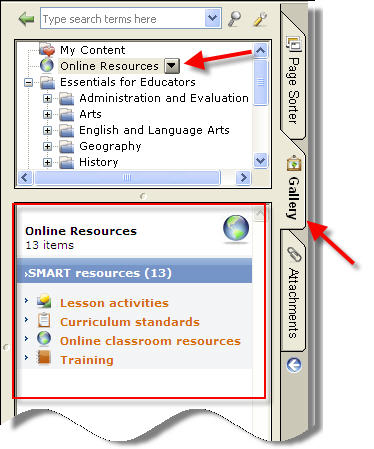
After you’ve played a bit with the Notebook software, you might want to download some pre-made lessons. You can search for content from within the Notebook software (see picture).
You can also search by grade and subject on the SMART Technology Website:Download pre-made lessons from SMART Technologies
You may also want to check out this handout to help you out:
Creating Lessons with Notebook Software
A couple of other things to explore:
 Teaching with Technology